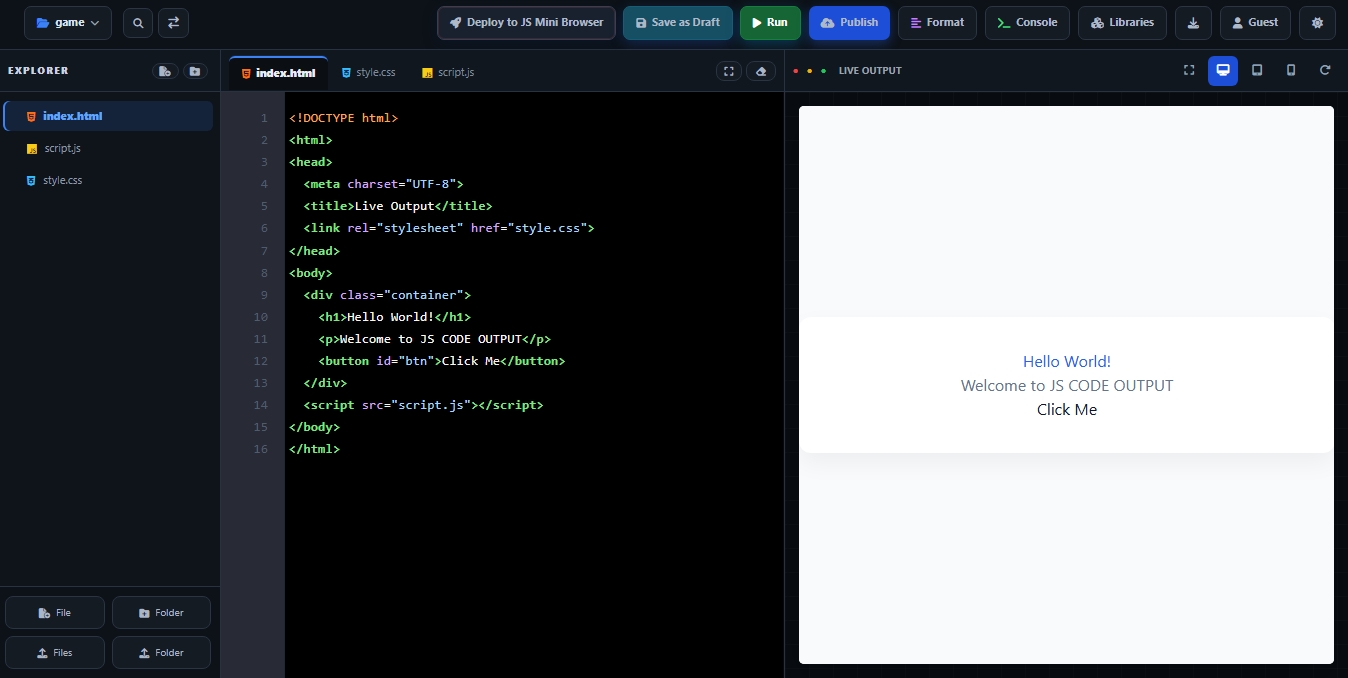
The professional web building workspace

Code it. See it live.
Build it beautifully.

JS CODE OUTPUT is a browser-based coding workspace built around a simple but powerful idea: write your HTML, CSS and JavaScript, see the result beside your code, experiment, refine the interface and move from a first idea to a working website without constantly changing tools.

HTML · CSS · JSOne browser-first workflow for the core web stack
Live OutputSee your webpage beside the code you are writing
80+ file typesBuilt to support more than simple snippets and demos
Why JS CODE OUTPUT

More than a code box: a complete browser-first building experience.

The platform brings the important parts of web development closer together, so you can focus on the thing that matters most — building. The live workspace, project structure, coding tools, preview and publishing flow are designed to make the journey from idea to finished website easier to understand and faster to repeat.

Why it can feel like one of the best places to build on the web

A great code editor is not only about typing code. It is about reducing the distance between an idea, the code that creates it and the result that people actually see. JS CODE OUTPUT is designed around that relationship. You can work with HTML for structure, CSS for appearance and JavaScript for interaction in the same browser-based environment, while the live output gives you a direct visual connection to what you are creating. That makes the workflow useful for beginners learning by experimentation, creators building visual ideas and developers who want a focused place to test frontend concepts quickly.

The experience is also designed to grow with a project rather than treating every experiment as a disposable snippet. Projects can keep their own files organized, the editor can work with multiple project files, and the wider platform includes features such as libraries, saving, publishing and export. In other words, JS CODE OUTPUT is positioned not simply as a place to type HTML, but as a practical path from writing the first line of code to testing and sharing a real browser-based project.

JS CODE OUTPUT workspace and live preview
The workspace

Everything important stays close to your hands.

Instead of writing code in one application and repeatedly opening another application to inspect the result, the workspace keeps the source and output together. This makes small experiments easier, debugging more visual and the build-test-change cycle much more natural.

01 / EDITOR

Focused code editor

Work with HTML, CSS and JavaScript in a dedicated coding environment with syntax highlighting, autocomplete, bracket pairing, search and linting-oriented feedback, making longer files easier to read and common mistakes easier to notice.

02 / PROJECTS

Organized projects

Keep the files belonging to different ideas separated into projects, so a portfolio, landing page, experiment, game or small web app can have a clear home and can be reopened when you want to continue building.

03 / LIBRARIES

Libraries on demand

The platform's workflow can include commonly useful web libraries such as Tailwind CSS, Font Awesome, Three.js and Chart.js, allowing projects to move beyond plain HTML and CSS when an experiment needs more capability.

04 / CONSOLE

Test and inspect

Running a project is part of the workflow, and the development experience can surface useful runtime information so you can identify problems, make a change and test again without leaving the browser-based workspace.

05 / EXPORT

Take your project with you

When your work is ready, the platform supports taking the code beyond the editor through project export, including a complete HTML file or a ZIP package for projects that contain multiple files.

06 / PUBLISH

From build to presentation

A finished project can move into the publishing flow, giving you a way to turn something you created in the editor into a live view that can be presented or shared rather than leaving it as source code only.

Live preview

Why live preview makes coding dramatically easier.

<h1 class="hero">Build anything</h1>

.hero {
  transform: translateY(0);
  transition: transform .4s ease;
}

document.querySelector('.hero')
  .addEventListener('click', () => { ... });

/* CODE → RENDER → ITERATE */

Instant visual feedback

When HTML, CSS and JavaScript work together, the live preview shows the resulting webpage beside the code. You can change a heading, button, spacing, color, layout or interaction, run the project and immediately compare the change with the result.

Better for responsive design

Live output is especially useful when a design needs to work across different screen sizes. Instead of guessing whether a layout will behave correctly, you can test the actual rendered interface and refine the structure and styling as you build.

Learn by seeing

For a learner, the connection between a line of code and a visible result is incredibly valuable. You write something, see what it changes, discover what went wrong and adjust it. That repeated cycle turns abstract syntax into something visual and understandable.

Write once. Watch it become a website. The closer your code and output are, the easier it becomes to experiment, understand, test and improve.
Animation created with web technologies
Creative motion

Build beautiful animations right where you build the page.

JS CODE OUTPUT is particularly useful for animation experiments because the technologies that create modern browser motion are already at the center of the workflow. CSS can handle transitions, transforms, keyframes, hover effects, loaders, reveals, moving backgrounds and many other visual effects, while JavaScript can control timing, user interaction, state and more advanced behavior. Because the live result sits directly beside the code, you do not have to imagine what a timing value or transform will look like — you can change it, run it and see the motion immediately.

That makes animation development much more approachable. You can start with a simple fade or movement, then gradually combine transforms, easing, delays, keyframes and JavaScript-driven interactions into richer experiences. For creators who enjoy making interfaces feel alive, this tight code-to-preview loop is one of the strongest reasons to use a browser-first editor: the creative experiment and the finished visual are always close together.

HTML · CSS · JavaScript

Three building blocks. One clear workflow.

01 / HTML

Structure

HTML defines what exists on the page — headings, paragraphs, images, links, buttons, forms, sections and the rest of your content.

02 / CSS

Design

CSS controls how that structure looks and behaves visually through typography, spacing, colors, layouts, responsive rules, transitions and animations.

03 / JAVASCRIPT

Interaction

JavaScript adds logic and dynamic behavior, from button interactions and menus to DOM updates, form validation, data handling and more advanced browser experiences.

04 / OUTPUT

See it live

Run the project and inspect the rendered webpage. Then return to the code, refine it and repeat until the result matches your idea.

The complete journey

From a blank idea to something people can actually experience.

The real strength of a browser-based development workflow is that it reduces friction at every stage. You can begin with a simple idea, enter the builder, create or open a project, work with the files that belong to it and start writing HTML, CSS and JavaScript. As you code, the workspace gives you a visual place to inspect the output. This is important because web development is inherently visual: a line of HTML changes structure, CSS changes presentation and JavaScript changes behavior. Keeping those pieces connected helps you understand the whole system instead of treating them as isolated tasks.

Once the project becomes more complete, the workflow can continue beyond experimentation. The platform supports project organization, cloud saving when using the available Google sign-in flow, publishing and export. That means a project can move from learning and testing toward a finished piece of work that can be shared, presented or taken elsewhere for further development. For students, this creates a practical way to learn by building. For creators, it creates a quick environment for turning visual ideas into functioning pages. For experienced developers, it offers a focused browser-first space for frontend experiments and rapid iteration.

JS CODE OUTPUT also supports a broader set of project needs than a single static webpage. The platform presents support for many common web and development file types, including HTML5, CSS3, JavaScript, React, Vue, Python, Java, C/C++, Rust, Go, PHP, Swift, SASS/SCSS, SQL/SQLite, JSON/XML, images, Markdown, video/audio and Docker-related files. The exact workflow can vary by project and file type, but the overall idea remains the same: keep the building experience organized, visual and close to the browser where the final result will actually run.

Most importantly, the experience is designed around learning by doing. You do not have to understand every web technology before opening the editor. You can start with a heading, style it, add a button, make that button interactive, create an animation, test a responsive layout and gradually build a complete project. Every change becomes a small experiment, and every experiment gives you a visible result. That makes JS CODE OUTPUT not only a tool for writing code, but a place where the process of understanding, creating and improving a website can happen together.
Ready to build?

Your next idea can start in the browser.

Open JS CODE OUTPUT, write your code, watch the result come alive and keep refining it until your idea becomes a real website.

↗ Open JS CODE OUTPUT